Download links
BRG Page Sections
Description
BRG turns the metronome into a rhythm laboratory for exploration, practice, and musical discovery.
A normal metronome marks time. BRG goes further: it lets you shape several rhythmic layers, hear how they interact inside a shared cycle, and follow the structure visually while the audio remains the master reference.
The app is built around three main musical surfaces:
-
B — Beats
The pulse or metric foundation. On its own, B can behave like a metronome: for example, B = 4 creates a four-beat cycle with a clear marker at the beginning. -
R — Rates
The rate layer. R defines how many rhythmic events occur across the beat span, creating subdivisions, tuplets, cross-rhythms, and faster internal motion. -
G — Grouping
The grouping layer. G organizes the rate events into accents, replacement sounds, and larger rhythmic shapes, making the relationship more musical and easier to feel physically.
Each surface can have its own sound, or several surfaces can share the same sound for a more monophonic pattern. By changing B, R, and G, the user can move from simple metronome-like practice to complex rhythmic relationships involving subdivisions, groupings, displaced accents, metric cycles, and repeating forms.
BRG also includes subgrouping. This lets a grouping be heard as a composite pattern built from smaller blocks of 2 and 3. An optional Split 3 as 2+1 setting can add another G hit inside subgrouping blocks of three, making clave-like internal patterns easier to hear and practice.
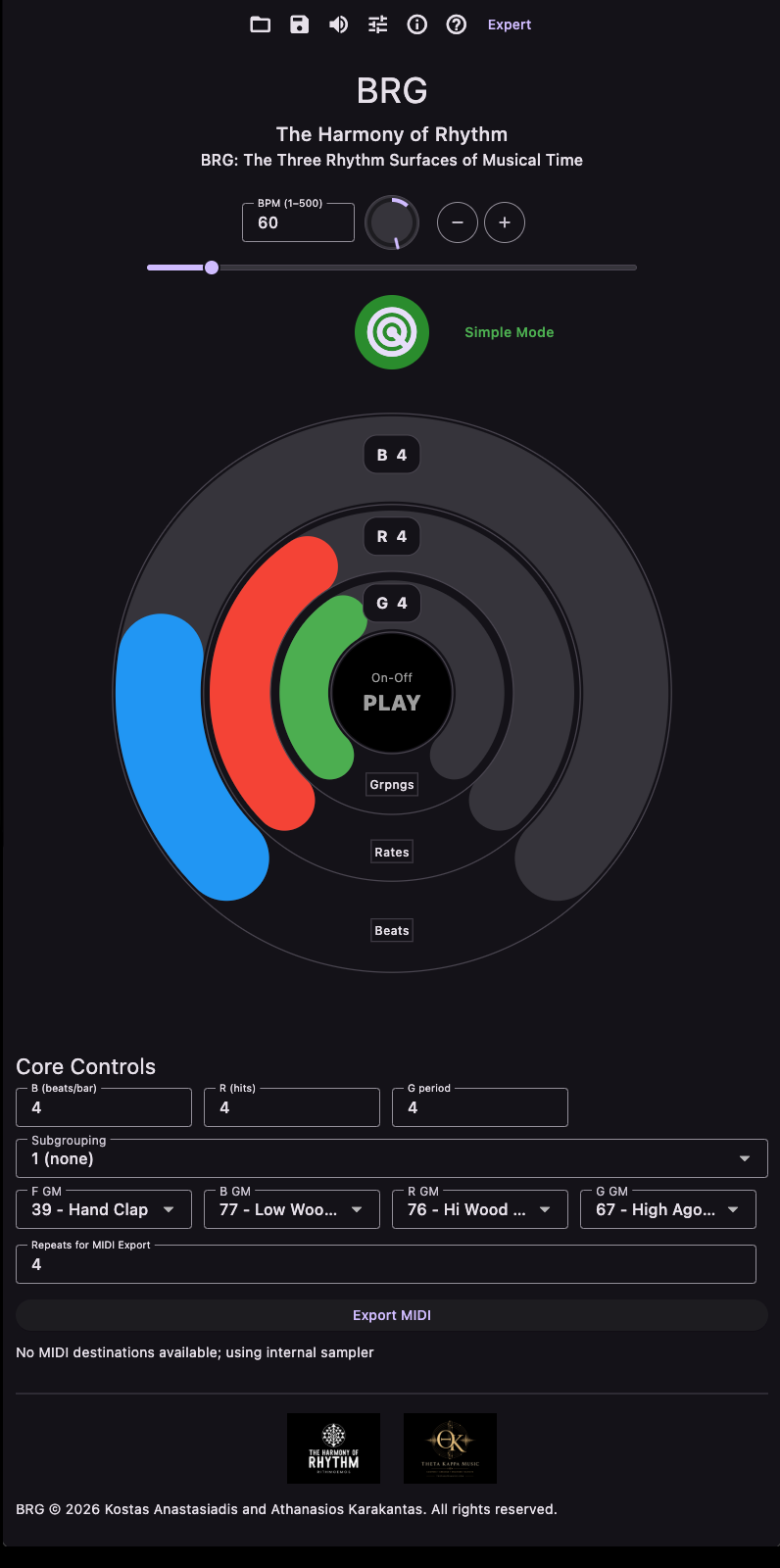
The current visual design uses concentric rings for B, R, and G. The rings are divided into segments, and the active segments can light up during playback in sync with the audio. Beat and grouping numbers can also flash during playback, so the structure is visible without replacing listening as the main guide.
In Basic Mode, the main controls are focused on the direct relationship between B, R, and G. Advanced Mode adds form length, rate spreading through Rdiv, grouping displacement, and a second grouping layer called G on G. An optional Extended B/G range opens much larger beat and grouping ranges for more experimental work.
The concept of BRG originates from Kostas Anastasiadis as part of The Harmony of Rhythm. The app was developed by Thanos Karakantas / Theta Kappa Music as an interactive audio-visual tool for bringing this rhythmic concept into practice.
Main Features
-
Real-time rhythm shaping
Use the concentric rings, touch controls, or number fields to change B, R, and G. Tempo can be adjusted directly, nudged in configurable BPM steps, or set with tap tempo. -
Audio-synced visual feedback
Playback lights can show B, R, and G hits, segment movement, beat numbers, grouping numbers, or only the B/form flashes when a cleaner display is preferred. -
Basic and Advanced modes
Basic Mode keeps the core BRG relationship clear. Advanced Mode adds F, Rdiv, G displacement, G on G, G on G displacement, and deeper structural control. -
Subgrouping and accents
Groupings can be split into 2s and 3s. Group Accent can emphasize every G replacement hit, while Split 3 as 2+1 can reveal additional internal movement. -
Layer sounds
Choose sounds for F, B, R, G, and G on G. Desktop versions can use GM-style MIDI sounds, while mobile versions use bundled internal sounds. - Tempo range from 1.0000 to 500.0000bpm The tempo can be set with high precision (4 decimal places), allowing for very slow or very fast practice and exploration.
-
Presets and packs
Save, load, rename, and delete presets. Factory presets, user presets, imported presets, and shareable .brgpack preset packs are supported. -
MIDI and audio export
Export the current pattern as MIDI, or use Export Ogg Opus to render it directly as compressed audio. The repeat count controls how many loops are written to the exported file. -
Context help and shortcuts
Optional context help explains the current controls inside the app. Desktop versions also include keyboard shortcuts for playback, mute, options, info, tap tempo, mode switching, preset loading/saving, and lights.
How to Use
BRG can be approached very simply at first: choose a beat cycle, add a rate, then add grouping.
Start with B. This defines the basic pulse cycle. If B is set to 4, you can think of it as a four-beat metronome cycle, with a clear marker on the first beat.
Next, adjust R. This introduces the rate layer: the rhythmic events that subdivide or multiply the beat cycle. With B and R together, you are no longer hearing only a pulse — you are hearing a relationship between the pulse and a second rhythmic layer.
Then adjust G. This adds a grouping sound to selected rate events. The grouping layer gives the pattern another rhythmic shape and makes the relationship more musical and more physical to practice.
A simple way to practice is:
- Set B to a familiar pulse cycle, such as 4.
- Set R to a simple rate and G to the same value.
- Listen until the relationship between the beat and the rate feels stable.
- Change G and listen to how the grouping changes the pattern.
- Try a subgrouping option and listen for the internal 2-and-3 structure.
- Clap, sing, play, or improvise along with one layer while listening to the others.
- Change one value at a time and notice how the feel changes.
The goal is not only to count the rhythm, but to internalize it. BRG is useful because it makes rhythmic structures audible, visible, and repeatable. You can practice against the beat layer, the rate layer, the grouping layer, the form marker, or a combination of them.
In Advanced Mode, additional parameters become available:
-
F — Form
Defines a larger form cycle. F can be entered in bars or beats and can be different from B, allowing the form marker to return after a chosen number of beats or BRG repetitions. -
Rdiv — Rate division / spread
Allows the rate to be spread over more than one beat, creating another layer of polyrhythmic relationship. -
G displacement
Shifts the grouping layer forward or backward, changing the feel of the rhythm while preserving the underlying structure. -
G on G
Adds a larger grouping layer on selected G notes. Its own displacement control can shift that larger layer independently.
Once a pattern is useful, save it as a preset, export it as MIDI for further work in a DAW, render it as Ogg Opus audio, or share it with another BRG user as a .brgpack preset pack.
BRG can be used slowly for focused practice, at higher tempos for performance preparation, or experimentally as a compositional tool. The same values can be heard as a metronome exercise, a polyrhythmic study, a form generator, or a source of musical ideas.